
User Acceptance Testing (UAT): Template, Checklist & Examples
By GiveFeedback.ioUpdated 7 min readEspañol

User acceptance testing (UAT) is the final round of testing in which the client or real users check that a website or web app does what they need before it goes live. On agency projects it's also the moment the client formally says "yes, this is what we ordered". This guide covers who does it, how it differs from QA, how to plan it with a test scenario template, how to collect issues and when to call it done.
What is user acceptance testing?
User acceptance testing is testing done by the people who will own or use the product, against their real tasks, to decide whether they accept it. The developer asks "does it work?"; UAT asks "does it work for us?".
For a website, that means the client's marketing manager publishing a blog post in the CMS, the sales team receiving the contact form leads, or a customer buying a product with a discount code. For a web app, it's the users doing their daily job in the new system.
UAT normally ends with a sign-off: a written approval that the site can go live and the project phase is complete. That sign-off matters for the agency too, because it marks where the agreed scope ends and new requests begin.
Who does UAT?
| Role | What they do in UAT |
|---|---|
| Client / product owner | Runs the scenarios, decides what is a blocker, gives the final sign-off |
| Client staff or end users | Test the tasks they'll do every day (editing content, handling orders) |
| Project manager (agency) | Writes the scenarios with the client, sets dates, triages issues |
| Developer / designer | Prepares the staging site, fixes issues, doesn't test their own work here |
The key rule: the people who built the site don't do the acceptance testing. They already know how it's supposed to work, so they don't see the problems a first-time user hits.
UAT vs QA: what's the difference?
QA and UAT are often confused because both involve "testing the site". They answer different questions:
| Aspect | QA (quality assurance) | UAT (user acceptance testing) |
|---|---|---|
| Question | Is it built correctly? | Is it the right thing for us? |
| Who | Agency or developer team | Client and/or real users |
| When | During and after development | After QA, just before launch |
| Based on | Specification, technical checklist | Business tasks and goals |
| Finds | Broken links, layout bugs, errors | Wrong workflows, missing content, unclear steps |
| Ends with | Issues fixed | Formal sign-off |
Do QA first. If the client starts UAT on a site full of broken forms and layout bugs, they'll spend their time reporting things you should have caught, and lose trust in the process. Our website QA checklist covers that step.
How to plan UAT in 6 steps
- Agree the scope. List what will be tested: page templates, forms, checkout, CMS tasks, integrations. Anything outside that list is not part of acceptance.
- Write test scenarios with the client. Each scenario is a real task, written as steps with an expected result (see the template below). Ten to twenty scenarios cover most brochure sites and small shops.
- Prepare the environment. A staging site with final content, real email delivery and test-mode payments. Give testers logins if needed.
- Set dates and testers. Name who tests what and the deadline. "Whenever you have time" means UAT never ends.
- Explain how to report issues. One issue per report, with a screenshot and what they expected. More on this below.
- Agree sign-off criteria before testing starts, not after.
Test scenario template (with examples)
A test scenario describes a task, the steps to do it and the expected result. Testers fill in the last two columns.
| ID | Scenario | Steps | Expected result | Pass / Fail | Notes |
|---|---|---|---|---|---|
| UAT-01 | Visitor sends a quote request | Home > "Get a quote" > fill form > Send | Thank-you message shown; email arrives at sales@ within 5 min | ||
| UAT-02 | Customer buys with a discount code | Shop > add 2 items > cart > apply code SPRING10 > pay (test card) | 10% discount applied; order confirmation email sent | ||
| UAT-03 | Editor publishes a news post | Log in > Posts > Add new > add image > Publish | Post appears on /news/ with image and correct date | ||
| UAT-04 | Mobile visitor finds opening hours | Open site on phone > menu > Contact | Hours visible without zooming; phone number is tappable | ||
| UAT-05 | Visitor switches language | Home > language selector > ES | Same page in Spanish; menu and footer translated | ||
| UAT-06 | Customer resets password | My account > "Forgot password" > email link | Reset email arrives; new password works |
Write scenarios in the client's words, around their goals ("a customer buys…"), not around technical components ("WooCommerce checkout"). If the client can't describe the expected result, that's a requirement that was never agreed, and better to find it now.
How clients and testers should report issues
This is where most UAT rounds slow down. Clients are not testers: they send emails like "the form doesn't work on my phone" with no page, no phone model and no screenshot. Each vague report costs a round of questions.
Give them a simple format. A good UAT issue report includes:
- Scenario ID (e.g. UAT-02), so you know what they were doing
- What happened and what they expected
- Page URL
- Device, operating system and browser
- A screenshot with the problem marked
- Severity: blocker (can't launch), major (must fix before launch), minor (can wait)
Example:
UAT-02 — Discount code not applied on mobile On iPhone (Safari), after entering SPRING10 in the cart, the message "Code applied" appears but the total doesn't change. Expected: 10% off. URL: staging.example.com/cart/. Severity: blocker.
You can ask for that by email, but clients forget half the fields. A visual feedback tool fills them in for you. With GiveFeedback.io, you add a script to the staging site and a feedback button appears. The client clicks it, marks the problem on a screenshot of the page, writes a title and description, and the report arrives with the URL, screen resolution, operating system, browser and version already attached. Testers don't need an account.
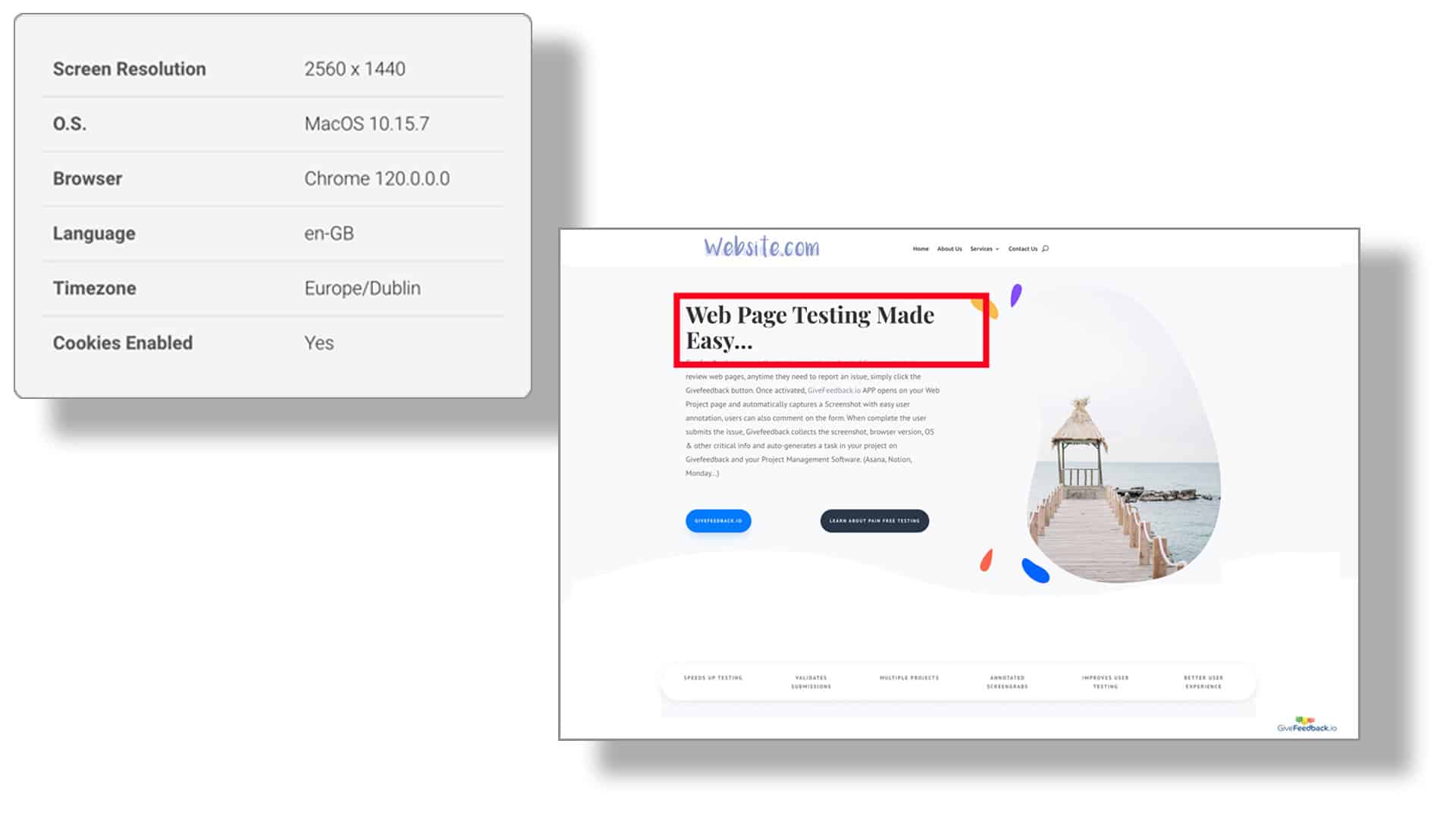
You can invite the client to the project so they see a read-only list of everything reported and its status (Open, Resolved, Archived), and send each report to Asana or Notion as a task. It doesn't record video or console logs, so for a bug in a complex web app the developer may still need to reproduce it themselves, but for most website UAT a marked-up screenshot plus browser data is enough.
Sign-off criteria: when is UAT done?
Agree these before testing starts and write them in the project document. Typical criteria for a website:
- All test scenarios have been run at least once
- No open blocker or major issues
- Minor issues are listed with an agreed fix date (they don't block launch)
- Change requests are logged separately and quoted
- The client confirms in writing (email or a signed form)
A simple sign-off email from the client is enough on most projects:
We've completed acceptance testing of the new website on staging. All scenarios UAT-01 to UAT-15 pass. The three minor issues in the list will be fixed in the first week after launch. We approve the site for go-live on 14 November.
Without written criteria, UAT turns into an open-ended list of "one more thing". With them, you have a clear line: the site does what was agreed, it launches, and anything new is the next phase.
Common UAT mistakes
- Starting UAT before QA is finished. The client spends their time on bugs you should have caught.
- No scenarios, just "have a look". You get opinions on colors instead of checks on tasks.
- Feedback in five channels. Email, WhatsApp, calls and comments on a PDF. Pick one channel and say so.
- Mixing bugs and new requests. Label them separately from day one.
- No deadline. Put UAT dates in the plan and in the contract.
For a deeper look at the approval step itself, see our guide to client website approval.
Write ten to twenty scenarios with the client this week, agree what "done" means, and choose one place for issues. That alone turns UAT from the most stressful part of a project into a short, predictable checklist.
Frequently asked questions
What is user acceptance testing in simple terms?
User acceptance testing is when the people who will use or own the website try it out on real tasks and confirm it does what they asked for. It's the last check before launch and ends with their sign-off.
Who performs UAT on a website project?
The client, their staff or a few real end users. The agency or developer prepares the test scenarios and the staging site, but doesn't run the tests themselves.
How long should UAT take?
For a typical agency website, plan one to two weeks: a few days for the client to test, time for fixes, and a short re-test. Fix the dates in the project plan so UAT doesn't drag on.
What happens if the client finds new requirements during UAT?
Log them separately as change requests. UAT checks the agreed scope; new features are quoted and scheduled after launch or as a separate phase.
What is the difference between UAT and beta testing?
UAT happens before launch on a staging site with the client or selected users and ends in formal approval. Beta testing usually happens with a wider group of real users on a live or near-live product to gather feedback, without a formal sign-off.
Keep reading

Guides
How to Choose a Website Feedback Tool (2026 Checklist)
How to choose the best website feedback tool in 2026: tool types, a 12-point checklist, a free scoring template and a one-week client trial plan.

Guides
How to Collect Client Feedback on a Website (Step by Step)
How to collect client feedback on a website: compare 5 methods, run a clean review round step by step, and copy our sample briefing email for clients.
Guides
Bug Report Template (Free Excel & Word) + Examples
Free bug report template for Excel, Google Sheets and Word, with good and bad bug report examples and the fields that matter for website bugs.
Collect visual feedback on your next website
Visual website feedback for agencies, freelancers and their clients.
Free plan forever · No credit card · Set up in minutes